【注意】最后更新于 December 18, 2021,文中内容可能已过时,请谨慎使用。
nomad是一个轻量级的工作编排工具,可以管理容器和非容器化的应用程序
官网
基础概念
架构图
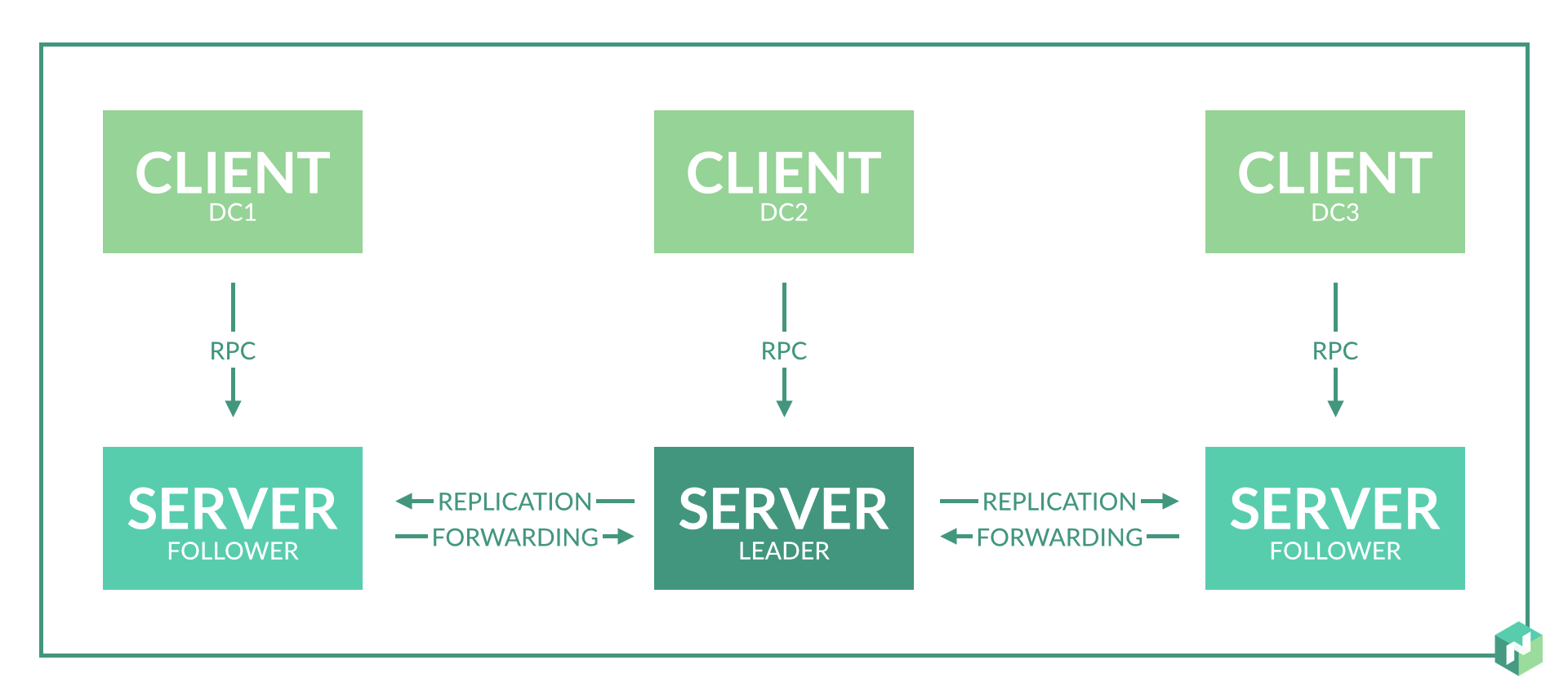
-
agent
基础模块,每个运行nomad进程称为一个agent
-
dev agent
用于测试的特殊agent,同时充当server和client,并且不会将集群状态持久化到磁盘
-
leader
管理整个集群
-
follower
非leader的server,复制创建调度计划,并将其提交给leader
-
server
在服务器状态下运行的agent,负责管理所有作业和客户端,进行任务分配.服务器之间相互复制数据并选举leader,已确保高可用
-
client
在客户端下运行的agent
-
job
job定义一个或者多个任务组,其中包含多个任务
-
task
nomad中的最小工作单元
-
evaluation
评估状态,当集群发生变化时,判断是否需要采取措施
Nomad Vocabulary | Nomad - HashiCorp Learn
Architecture | Nomad by HashiCorp
安装
安装很简单,只需要下载一个二进制文件或者直接使用软件安装工具既可
Install Nomad | Nomad - HashiCorp Learn
centos
1
2
3
|
    yum install -y yum-utils
    yum-config-manager --add-repo https://rpm.releases.hashicorp.com/RHEL/hashicorp.repo
    yum -y install nomad
|
debian/ubuntu
1
2
3
|
curl -fsSL https://apt.releases.hashicorp.com/gpg | sudo apt-key add -
sudo apt-add-repository "deb [arch=amd64] https://apt.releases.hashicorp.com $(lsb_release -cs) main"
sudo apt-get update && sudo apt-get install nomad
|
本地运行
1
|
nomad agent -dev -bind 0.0.0.0 -log-level INFO
|
查看ui http://127.0.0.1:4646/ui
常用命令行
 1
 2
 3
 4
 5
 6
 7
 8
 9
10
11
12
13
14
15
16
17
18
19
20
21
22
23
24
|
  # 运行dev模式agent
  nomad agent -dev -bind 0.0.0.0 -log-level INFO

  # 初始化一个示例配置文件
  nomad init

  # 运行/更新一个job
  nomad job run <example.nomad>

  # 查看job状态
  nomad job status <example>


  # 比较更改
  nomad plan <nomad_file>

  # 停止job
  nomad stop <nomad_file>

  # 查看状态
  nomad status <nomad_file>

  # 列出server
  nomad server members
|
和k8s对比
个人感觉比k8s容易维护,入门也简单,适合中小团队使用,
官网比较Nomad vs. Kubernetes | Nomad by HashiCorp